On this page, we explain how to set up Reo link wifi. You will learn how to install RCL series and DUO series wireless camera models from reolink camera models with the reolink app. If you want to do this setup process with the LAN internet connection from your router, you can do it without using a LAN connection.
First of all, turn on your Reolink camera by plugging it into the socket via the DC adapter. Set up internet connection wired or wireless. Then you can download the application by searching the Play store as reolink app. Or you can download the application by scanning the QR code on the camera.
How to setup Reolink Wifi Camera
As in every camera, we first open an account through the reolink camera app you downloaded. After giving the necessary permissions, we create a record. Do not forget to enter your e-mail address, phone number and location. Then you can add your reolink camera by saying “add device” on the main menu of the application.

If you do not succeed in the installation process of the cameras by scanning the QR code, there is a 16-digit code starting with UID just below it, you can introduce your camera to the application by entering it on the application. This is the main setup, the next steps are actually about the use of the camera.
The other thing to do is to give your camera a name on the application. For example, you can name it like “garden or kitchen camera”. You can then create a password. In the next step, to use the wireless connection feature, you must select your wifi network and enter your user name and wifi password and connect to the wireless network.
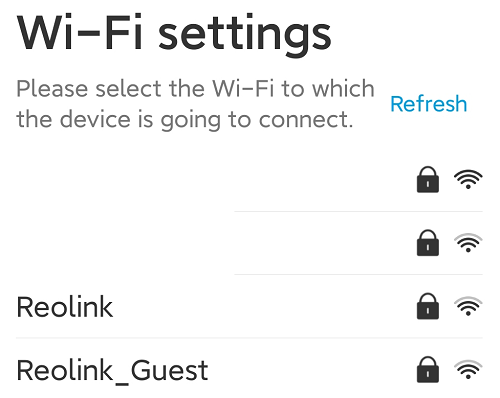
AFTER CONNECTING TO THE WIFI NETWORK, THE INSTALLATION PROCESS IS COMPLETED. NOW ALL YOU NEED TO DO IS CUSTOMIZING AND SETTING YOUR CAMERA ACCORDING TO YOURSELF.
How to troubleshoot Reolink Camera
You may experience some problems with your camera. Now I will tell you about the problems and solutions you may experience.
- I forgot my camera login password, what should I do?
- How to change camera password?
- How to change Reolink app password?
- Why is my Reolink camera not connecting to WiFi?
- Why is my connection failing on Reolink?
In case of password recovery or password change, you can reset or change your password both from the application and from the forgot password section at web cclient login. If you do not remember your e-mail address or mobile phone number, then you should reset the device and set up from scratch and create a password from scratch.
If your Reolink camera is experiencing wireless network problems, that is, it cannot set up wifi or disconnects, the action you will take is to bring your router and camera closer to each other. When your wifi area is not enough, your connection will be lost or some features of the camera will not work. Especially in the first setup, having your router side by side with your camera will provide a healthier setup.
Reolink Camera SD Card
You can use SDHC or SDXC micro SD cards for your Reolink camera. It supports 64GB as maximum memory. It records short videos to the memory card. You can use cloud systems with an SD card external fee. When using the cloud system, more features related to live video recordings and notifications are used. Since the memory of your SD card is full, the first images are deleted and new ones are added.