About the Laview camera, on this page, we will tell you how to install it, its settings and solutions to problems you may encounter.
You can use the QR code to set up your camera. First, plug in your camera and turn it on. Download Laview app from play store market. Turn on the wifi connection bluetooth on your mobile phone.
Tap the + sign on the home screen of the app and say “add device”. The indicator will flash quickly while the connection is established.
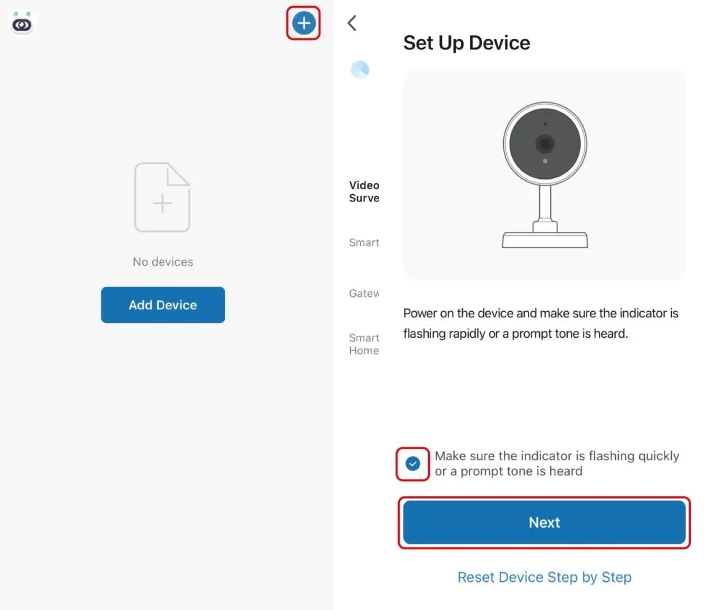
Make the wifi network connection. It is important to keep the camera and the router close to each other during the initial setup for a stable connection. Once the wifi connection is complete, the installation is finished. Now you can make the settings you want.
You can perform the settings listed below by logging into the mobile application.
- Device sharing
- Video recording and timing
- Motion Detection
- Setting alarm
- Notification sending settings
Laview Camera Problems
LaView camera not connecting to WiFi
There may be several reasons for this, you can try the troubleshooting steps I have given below.
- You have not fully established your wifi connection. Your wifi name or password may be wrong.
- Another reason is that the router and the camera must be close to each other when doing the initial setup. If the camera cannot see the wifi area clearly, the wifi connection cannot be established or it may give a connection failed error later.
LaView camera Offline
The steps you need to check are listed below;
- The low battery level of the camera may have caused this. Charge your device.
- Usually the offline problem is caused by the router. Either your modem is turned off or the wifi area is not enough. Turn your modem on and off and wait for a while.
- If you changed your router, that is, your modem, your wifi password has changed automatically. The wifi password is written on the back of the new modem. You can find out by looking there.
- Check if your camera is on or not, maybe it’s turned off.
- Changing memory card can sometimes cause connection problems. Usually the problem may occur if you insert incompatible memory card. You can use SANDİSC memory cards in Laview cameras.
My Laview camera not sending notifications?
* If motion and human detection is turned on in your camera’s settings, and if there is no notification even though this setting is on, you should check the sensitivity setting.
* Again check wifi network connection quality and fix wireless connection issues.
* You cannot receive notifications if your device is turned off. If the camera is out of charge, fill it up.