Arlo Pro 4 is one of the cameras that we think is very useful and worth buying in terms of camera features. It has all the features such as being rechargeable, night vision, conversation, image quality, night vision, integrated spotlight.
You can use your camera more efficiently with some tools you can use. For example, anti-theft mounts, solar panel charger, outdoor power cord and powerful rechargeable batteries will increase efficiency.
How to setup Arlo Camera
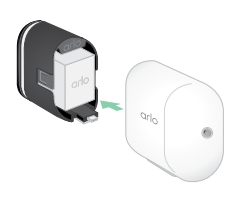
First, charge your camera’s batteries. This is a simple process you can do by plugging the power cord into the outlet. You can also buy and use devices that charge dual batteries. Be sure to charge the batteries before starting the installation. Then insert the battery into the device, the insertion direction is one-way, you can easily insert it and the indicator light on the camera will flash blue.
Download the Arlo application from the store markets where we downloaded the application. We will install and use the camera through this app. First of all, we open an account on Arlo. We create your account by entering our e-mail address and some permissions and privacy policies requested. We open our Arlo application on our mobile phone and connect to our wifi network, touch the “add new device” part and we provide our connection. When we open our camera, when we update it, LED lights help us with its indicator. Let’s take a look at them now;
- Slow flashing blue: The camera is paired with the SmartHub.
- Fast flashing blue: Pairing the camera with the SmartHub is complete.
- Flashing amber: The camera is low on battery, cannot be paired.
- Alternate blue and amber.: In process of resetting or updating.
Note about Wifi Setup
When you set up your camera, connect it directly to the 2.4Ghz channel of your router. It is useful to keep your camera close to the router during the initial setup. Afterwards, if it is too far from the router or in between, very thick walls, metals, large water tanks such as aquariums will reduce the transition area of the wifi. Usually the problem is that your internet is running at 5ghz and you are not aware of it. There are 2 types of wifi networks in your router. 2.4ghz and 5ghz. If you log in to your router and name these networks, for example 2 or 5, you can connect to the correct wifi network when connecting from a mobile phone.
How to use your ARLO Pro Camera

A usage is shown in the image above. After that, all you need to do is to examine the application and make all the settings according to your wishes. It is easy to use the device and the app. I don’t want to waste a sentence by writing here. For example. The necessary icon is available to turn on the spotlight. Just like cell phones. There are direct START and STOP texts to start and stop recording to the camera. In addition, you can easily make the arrangements you want in the menus such as recording, snapshot, settings, video settings, notification settings.
How to use your ARLO Pro Camera
A usage is shown in the image above. After that, all you need to do is to examine the application and make all the settings according to your wishes. It is easy to use the device and the app. I don’t want to waste a sentence by writing here. For example. The necessary icon is available to turn on the spotlight. Just like cell phones. There are direct START and STOP texts to start and stop recording to the camera. In addition, you can easily make the arrangements you want in the menus such as recording, snapshot, settings, video settings, notification settings.
Note: during installation, make sure that your notifications are turned on and that the device is charged. Especially if the charge runs out during the update, it may cause a malfunction in the device. You can use your Arlo camera with Amazon Alexa and Google assistant.
Yes I mind that will help to how installed my camaras in my place tanks