We will explain the ring indoor glass installation step by step. First of all, start your device by plugging it in. You can put your device on a flat surface such as a table, or you can mount it on the wall. In order to use the camera, you need to complete the Ring application and the download installation from the play markets. We first explain the wall mounting and then the parts about the mobile application on this page.
How to mount the ring indoor camera on the wall?
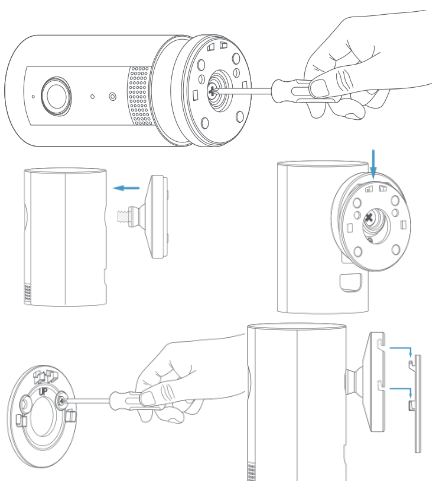
Remove the cover on the back of the device and remove the screw with the help of the screwdriver. Screw this base part you removed to the back of the device. Take out the mounting bracket and screw it to the wall. Place your camera on the bracket you have mounted on this wall by means of hooks. Now plug in the device, press the power button and you can adjust the orientation of your camera.
How to setup Your Ring Camera with Ring app
First, you create a ring account. You need to log in to the ring account with the e-mail address and the password you created. You may need to enter some privacy policies and information such as location.
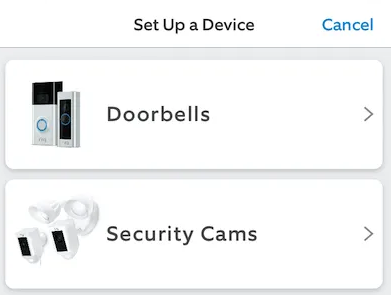
- Step Four – Tap “Set Up a Device”
- Tap “Set Up a Device” then select “Security Cams.”
The next step: Read the QR code on the back of your device and then specify your location. For this, you need to have location permissions turned on in the app. In order to use the application’s features properly, you must have the location turned on and given its permissions.
If you have more ring devices, give your device a name to avoid confusion. For example; Like “Ring PET”. Then connect to the ring wifi network. If you can’t see your wifi network, first turn your wireless network on and off and list all wifi networks, then connect to your own wifi network. Make sure your router and camera are close to each other. After you enter your wifi password, it will connect to the wifi network and your device will start to update. During this time, the blue light on the device will start flashing. When the light stabilizes, the update is finished and you can now start using your camera.
Where should I place my camera?
Usually, you just need to put your camera flat on a shelf or counter. It is more advantageous to put it in the upper corners to see a wider area. Here it is important to position the camera according to its intended use. If you are using it for your pet, for example for an incision, you must make sure that the cat will not reach the camera and drop it. But if you use it to control whether your baby is sleeping or crying, you can place it on a flat surface by the baby’s bedside.
How I’m connected my ring camera