Redmi watch 2 lite is a smart watch that works with both android and ios. It has a stylish appearance with GPS feature, waterproof, multiple exercise modes, 1.55 flat screen.
On our page, we explain how to connect and pair the device. First of all, you download the Mi fitness / Xioami wear application from the relevant application markets. When you download the application, some privacy policies will appear. You confirm these and log in to Mi Account. If you don’t have an account before, you can create an account with your e-mail address.When you go to your profile, it asks for permission for the location. You can give permission while registering and remove it later.

You can download the mobile application via the QR code that appears when you turn on the watch. Then click on Add Device at the bottom of the profile and select Redmi Watch 2 Lite. Make sure your device is fully charged. Since the device will make some updates during the first installation, half the updates can affect your watch badly.
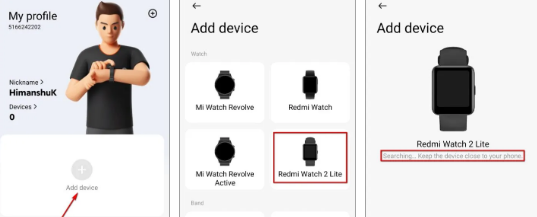
It will now scan the watch and try to connect when it finds it. You can complete the connection by confirming this both on the phone and on your smart watch. Make sure the bluetooth feature is turned on so that your pairing can be completed successfully. The notification feature of your mobile phone must be turned on so that the pairing notification comes to your phone. If you have a problem during pairing, you can try again by resetting your device.

Your pairing and smartwatch with phone has been successfully completed. In the iPhone setup, the processes are performed in the same order. I phone asks for more permissions while downloading the app in the first place. You must confirm all of these.
How to update your Redmi watch 2 lite
After you set up your watch with your Android or iPhone device, you can use and control your watch from the Mi Fitness app. It is recommended to upgrade your smartwatch to the latest version.

Enter the Mi fitness application on your mobile phone and enter the profile section there. When you scroll down, tap on “check for updates”. If the device has received a new update, upgrade the device to the latest version. This process takes a few minutes. If your charge is below 50%, do not perform the update process. Turning off the device during the update may cause problems.
Here are 3 important steps we can take for any problems with the device:
- First of all, turn your Redmi watch 2 lite on and off.
- Upgrade the software to the latest version.
- Reset your device.